
Assignments
Assign staff to the booking
Choose who is responsible for a booking, and the shift is added to the calendar. If someone already has a shift, another booking or has marked themselves unavailable, you see it before you save.
- Shifts per person in the calendar, with their own colour
- Assign from the booking or the manifest
- A warning if someone can't, you still decide

Tilldela personal
Välj vilka som ska vara ansvariga för denna bokning.
Du kan fortfarande tilldela – detta är en upplysning.
Availability
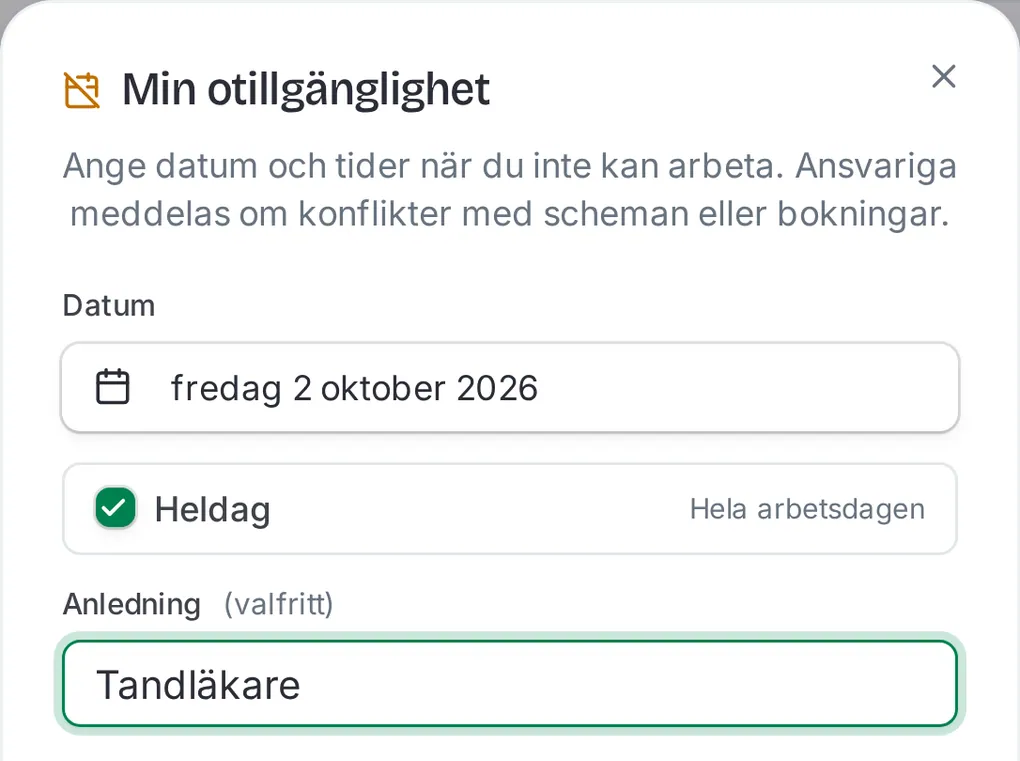
Staff say when they can't work
A whole day or a few hours, with a reason if they like. You see everyone's entries, each person sees their own.
- Whole day or times, with a reason
- Scheduled hours per person, by week or month
- Own shifts in Google, Apple or Outlook

Manifest
The day on one page
The manifest shows the day's bookings, who leads them and what is unpaid. Tick them off when the group starts and when it is done.
- Check in at the start and out when the tour ends
- The day's payment status at the top
- Email or SMS to chosen guests

More about staff
Three roles
Admin, site manager and staff. Staff see the manifest, calendar and history.
Invites by email
Invite with an email address and a role. The link is valid for seven days.
Bookings by staff
Staff can book for guests and check them in, but not change bookings.
Staff hours
Scheduled hours per person, by week, month or year.
On the phone
The same admin on the phone, with the calendar as a list per day.
Guide: scheduling
A video guide shows how to put in shifts and assign staff (Swedish).
Frequently asked questions
What can staff see and do?
Staff see the manifest, calendar and history, can book for guests and check them in and out. They can't schedule others, see hours or change bookings. Admins and site managers can.
What happens if I schedule someone who can't work?
You get a warning showing what clashes: unavailability, another shift or another booking. You can still assign them, so you decide.
Can staff see their shifts in their own calendar?
Yes. Each person creates a private link to their shifts and adds it to Google, Apple or Outlook. The calendar updates from Denira, not the other way.
How do I invite staff?
As an admin you invite with an email address and choose a role. The invite goes out by email, or you copy the link. It is valid for seven days.
Does Denira track hours worked?
Denira adds up scheduled hours per person. There is no clock-in or clock-out.

Get started today
Create the account yourself, or let us set everything up with setup help. Start costs SEK 0 a month.
No card needed for Start. Setup help: free for the first 20 businesses.
We reply within 24 hours.
Support
support@denira.ioMoving from Bookspot?
The import brings over experiences, prices and bookings, and setup help is free for you.
Questions?
Write to us and we will reply within 24 hours.